| Version 11 (modified by , 10 months ago) ( diff ) |
|---|
Cinnamon architecture
Diagram
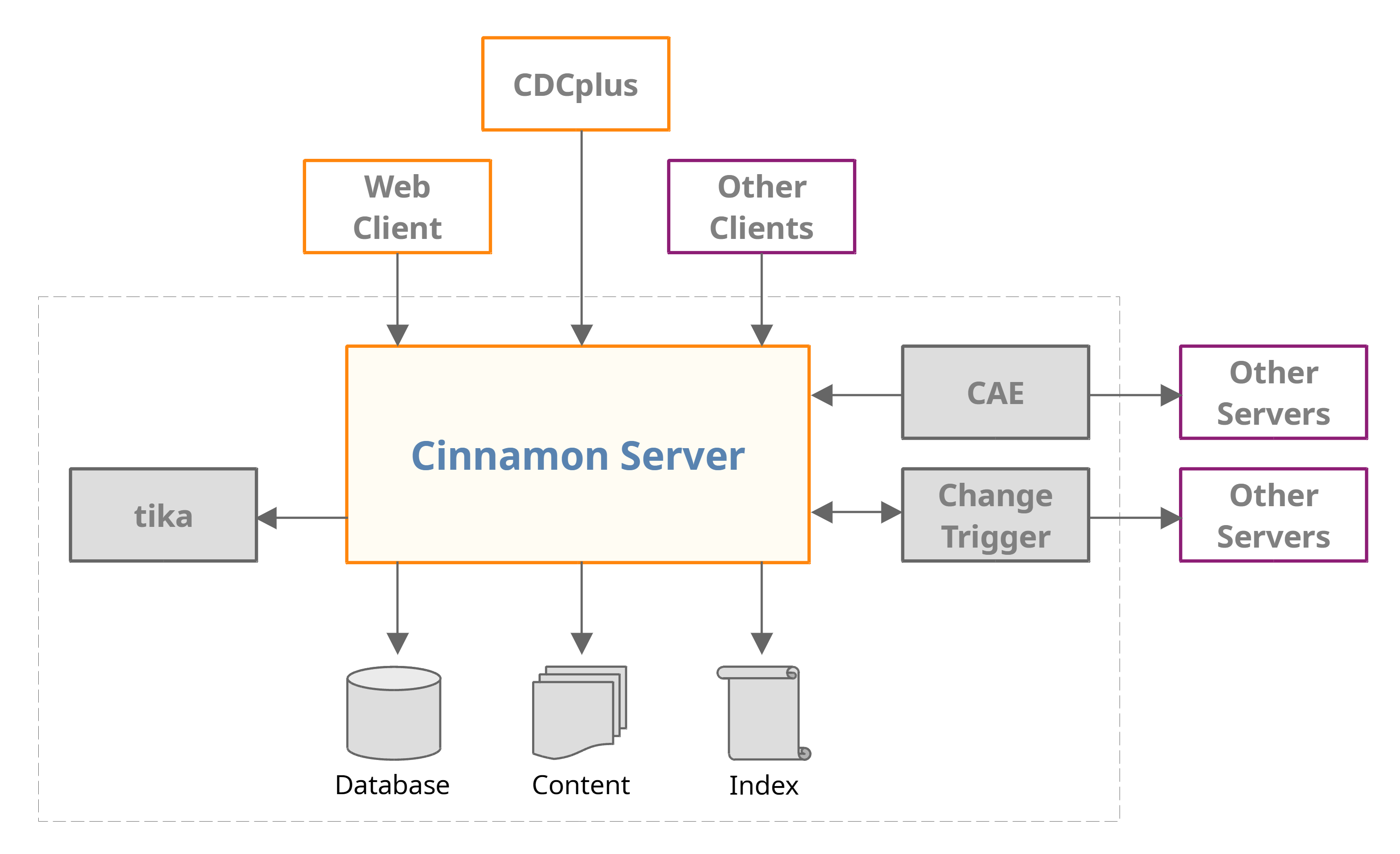
The following diagram shows the architecture of a Cinnamon system with its peripherals.

Components
Cinnamon Server
The server is the core Cinnamon component. Accessing all backend data and secondary services is exclusively done through the API. Thus, clients don't have and don't need access to the database, the content or the index directly, don't store backend credentials and can't bypass server functionality like permission checking. The API is complete in the sense that all client components like CDCplus, CAE or Change Trigger are implemented using API methods and nothing else. Likewise, the API exposes complete admin functionality for user accounts in the _superusers group.
The Cinnamon Server API is based on http(s)/XML. Find the documentation here: https://github.com/dewarim/cinnamon4/blob/master/docs/api.md
The API can be exposed through http or https. In the most simple case, the server listens on http, thus, client processes running on the same machine can access the server without encryption (avoiding issuing certificates for local traffix, which is convenient for test and development setups). By firewall settings, this can be restricted to local access and access from a web proxy and / or a VPN, where encryption is added. Alternatively, the server can be configured to listen only on https by itself. The API client supports both, including handling of
self-signed certificates for internal traffic.
No customization of a Cinnamon system is applied to the server. The core server is a standard application under an Open Source license, and thus, can be used and distributed without license fees. Rather, customization is applied by using plugins for CAE or Change Trigger, by extending the Windows desktop client CDCplus or by building a custom web frontend.
Database
Cinnamon uses a PostgreSQL database for structured storage of information like these:
- System data for folders and objects.
- Metadata for folders and objects.
- Relations between objects.
- Configuration and taxonomies.
- User / group / permission / lifecycle managemnent.
The database is exclusively accessed by Cinnamon Servers. All client applications must use the API.
Content
Content files are stored in the server (virtual) machine's file system, or on a separate volume mounted to the file system. Like the database, the content files can't be accessed directly from the clients, the API must be used, where e.g. permission checking applies. The content files are not named and organized as they appear in the folder structure view in the client, rather Cinnamon Server stored them in a generated path and keeps the content path with the object in the database.
Backing up the server is done by backing up the content and a dump from the database. The data of a Cinnamon Server, including user accounts, permissions etc. can be completely restored from these data. The same technique can be used for duplicating a Cinnamon Server or for migration to a different machine.
Index
Cinnamon uses the Open Source indexing engine Lucene (https://lucene.apache.org/) to enable full-text, system data or metadata search on objects and folders. Index entries are associated with the ID of the indexed asset and are based on named fields, standard ones (like name, creation date, language or owner) and custom ones (like product association, target group of a DITA topic or width and height in pixels of a bitmap). The custom index items are configurable and seamlessly integrate with the standard ones in search, and the search and metadata GUI. The index is fast and does not significantly slow down with very many objects in the server.
tika
Index items as described before are based on XPath. Since metadata, XML content and system data are exposed to the index engine as XML, XPath is a convenient way to find all content in the XML structure to be indexed to a specific field name.
This would not work with binary data like Word documents, PDF files or JPG images though. Therefore, content formats that are not by themselves "machine-readable" (Cinnamon supports XML, plain text or JSON) are converted to XML by the Open Source software tika (https://tika.apache.org/).
The result is XHTML which is stored as XML metadata in Cinnamon. From there, regular index items can pick the content up and have it indexed. This is more powerful than a flat full-text index. More specific index items can, for example, extract only content that is in tables, or in an Excel document, access only data in specific sheets, or index the dimensions in pixels for bitmap files - anything that can be expressed in XPath.
CAE
CAE stands for Cinnamon Asynchronous Engine. It's purpose is to run processes that are not time critical and / or run too long to do them synchronously. One example is translation of a batch of topics, or PDF publication of a DITAmap. For such functionality, the CAE framework can receive request objects from clients and process them asynchronously. CAE plugins log their activity and can send notifications when, for example, a PDF publication has completed, or was unsuccessful due to DITA errors.
There are standard plugins, commercial extensions are available, and the simple plugin interface makes it easy to develop custom ones.
Change Trigger
Change Trigger is the counterpart to CAE, as it allows customization in a similar, plugin-based way, but executes the customization synchronously.
CDCplus
Web Client
Other Clients
Other Servers
Attachments (1)
-
Architecture.png
(116.4 KB
) - added by 10 months ago.
Cinnamon architecture
Download all attachments as: .zip